
Imagine the scene: you’ve just wrapped up your FastAPI server. It runs smoothly on your laptop. But the moment you deploy to staging, it explodes with a ModuleNotFoundError: No module named 'pydantic'.
You give a sharp look at the error. Pydantic is clearly listed in requirements.txt. You’ve installed it countless times. But here’s the catch: your laptop runs Python 3.12, while staging is stuck on Python 3.9 with a system-managed pip. That mismatch in version numbers made pip skip the package without a word.
Two engineers. Three hours. Not a single buggy line. The culprit wasn’t your code — it was the environment all along.
This is the headache Docker is designed to erase. Instead of adding more complexity, Docker simplifies the variable entirely. Your code and its environment travel together as a single, inseparable unit — wherever you go.
What Docker Actually Is
Docker is a platform that enables you to package your application and all its necessary dependencies — the language runtime, libraries, system tools, and configuration files — into a standardized, portable unit known as a container.
Build it once, and it runs identically — on your laptop, your teammate’s computer, a CI server, or a sprawling AWS production cluster.
How It Works Under the Hood
Docker isn’t magic. It’s a clean interface over three Linux kernel features:
Linux namespaces — give each container its own isolated view of the system: its own process list, its own network, its own filesystem. One container can’t see what another container is doing.
cgroups — enforce resource constraints on each container, such as CPU and memory limits, so no container can exceed its allocation or disrupt others.
OverlayFS — a layered filesystem that allows Docker to store file changes in efficient, stackable layers, enabling images to remain lightweight by sharing unchanged data across containers.
Docker didn’t invent these features — it just made them easily accessible for everyone. Before Docker, managing these kernel powers meant writing complex C code. Docker gave us a much simpler way to handle it.
Key point: Docker is not a virtual machine. VMs spin up whole operating systems. Containers simply borrow the host’s kernel, each with its own private view. That’s why containers launch in milliseconds, while VMs take minutes.
Images vs Containers — The Core Difference
This trips up almost everyone at first, so let’s make it unforgettable.
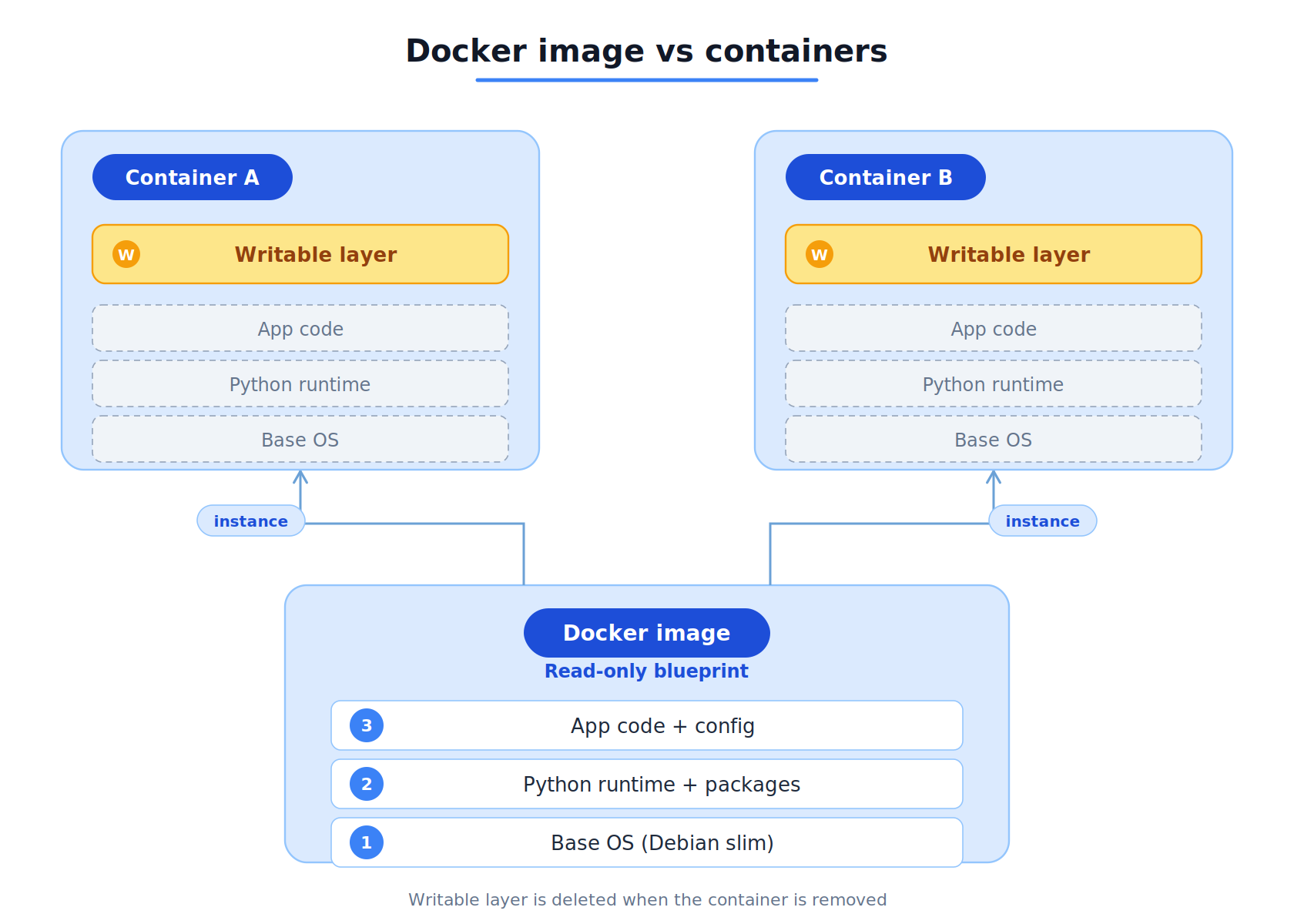
A Docker image is a read-only snapshot. It includes application code, installed dependencies, the runtime environment, and metadata — each packaged into distinct layers. It cannot be executed directly, but it serves as a blueprint for creating containers.
A Docker container is a running instance created from an image. It operates as a live process in an isolated environment, allowing multiple independent containers from a single image, each with its own scope to avoid interference.
Think of it this way:
Image = a class definition in code
Container = an instance of that class
You define the image once. You instantiate containers from it as many times as you need.
Containers mount a writable layer on top of the image’s read-only layers. Any file changes within a running container are stored in this writable layer and are deleted when the container is removed. To persist data across container restarts, use volume mounts.
What’s Next
Now you know what Docker is and why it exists. You understand the three kernel features powering it, the difference between VMs and containers, and the image-vs-container mental model that everything else builds on.
But understanding isn’t the same as doing.
In Part 2, we’ll roll up our sleeves and put all of this into practice. You’ll learn every Dockerfile instruction, containerize a real FastAPI application from scratch, master Docker’s layer caching strategy, debug running containers, and push your image to a registry — ready for deployment.
It’s time to build.
Next up → From Dockerfile to Registry — Your First Real Docker Build